Running a blog on WordPress can outwardly seem easy but underneath the hood there could be problems happening that you need to know about.
In any blog there are many objects with links being created every time you post an entry, add a new feature or add a new plug-in. Also, in the life of your blog you may end up moving. Any or all of these situations can lead to links being broken, generating 404 Objects Not Found Error messages. These errors can not only cause display or processing problems but can slow down your site increasing the page load times.
On April 3rd 2007, I moved “Meandering Passage” to the current host. While I was able to get the site up and running quickly I knew that it wasn’t running at it’s top efficiency. By looking at the logs I could knew there were a many 404 errors being generated every day. This couldn’t be tolerated for long.
However, I wanted to fix the current 404 errors, but I also wanted to find a effective way to monitor for future errors.
I think I found both answers in the form of the WordPress 404 Notifier plugin by Alex King. This plugin logs 404 hits on your WordPress powered site and will notify you of them via e-mail or in an RSS feed. You supply the plugin with an email address and each 404 error will generate an email, or you can subscribe to a site specific 404 Error RSS feed with your feed reader of choice.
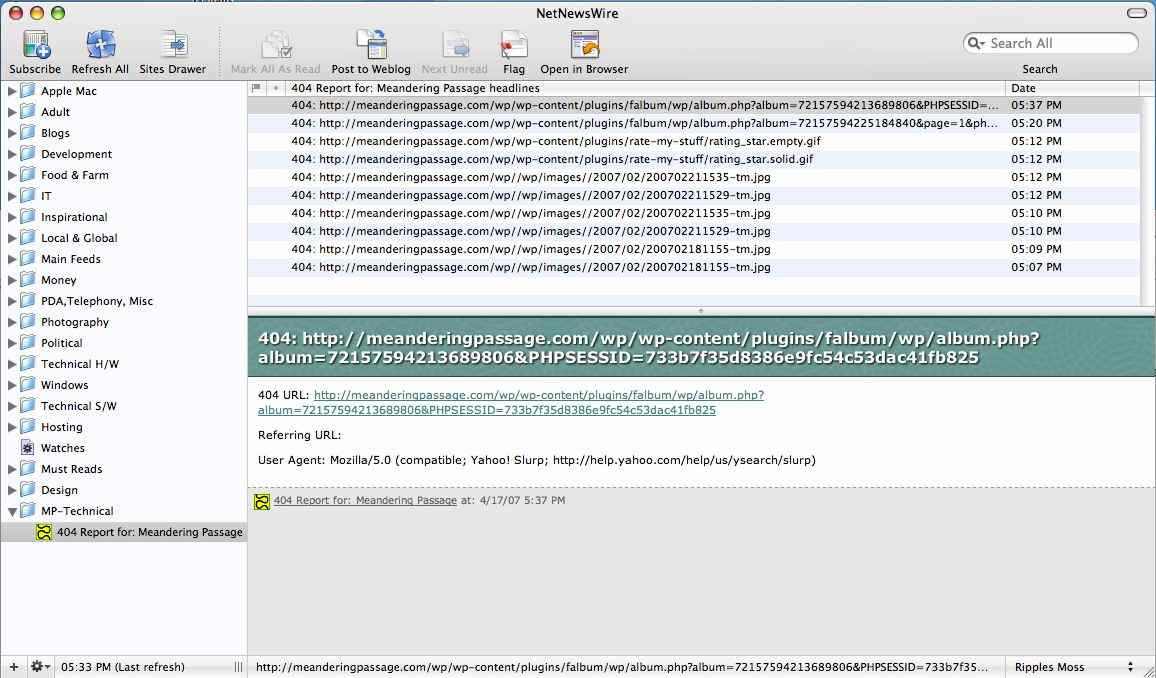
I chose the RSS feed method of notification. NetNewsWire is my main home feed reader and after subscribing to the 404 Error feed from my blog, I could see the details of each generated 404 error message. Since often the errors are repeated, I’ve manage to eliminate 90% of the 404 errors in just a couple of hours or monitoring.
It’s the old, “you can’t fix what you don’t know” and the 404 Notifier plugin for WordPress will keep you in the know about objects that can’t be found!
Technorati Tags: 404 error, blog, blog tips, plugin, wordpress
Nice information. Very useful to newbies. Thanks for sharing.
Hi, i installed the plugin and tried to enter an invalid URL and then I got the notification but it keep on sending to me now!
Please help! What’s wrong actually?
Thanks nice article for SEO. I am use 404 pages list to latest post
Cool!
tnx for the tip, I’ll try this plugin
hey there and thank you for your info – I have certainly picked up anything new from right here. I did however expertise some technical issues using this hand history web site, since I experienced to reload the website many times previous to I could get it to load properly. I had been wondering if your hosting is OK? Not that I am complaining, but slow loading instances times will sometimes affect your placement in google and can damage your high quality score if advertising and marketing with Adwords. Well I’m adding this RSS to my email and could look out for much more of your respective interesting content. Ensure that you update this again very soon..